Tool 02
Equaliser & Frequency Trainer
Low shelf, peak and high shelf, with the resulting curve drawn over the live spectrum. Once you know the controls, switch to the trainer: a hidden boost is applied and you have to find it by ear.
Equaliser Workspace
or drop a file here.
Load a file or a demo loop to begin.
Low shelf
Mid peak
High shelf
Blind frequency trainer
Start an exercise to apply a hidden +6 dB boost. The player starts automatically if it was stopped.
- Correct
- 0/0
- Streak
- 0 (best 0)
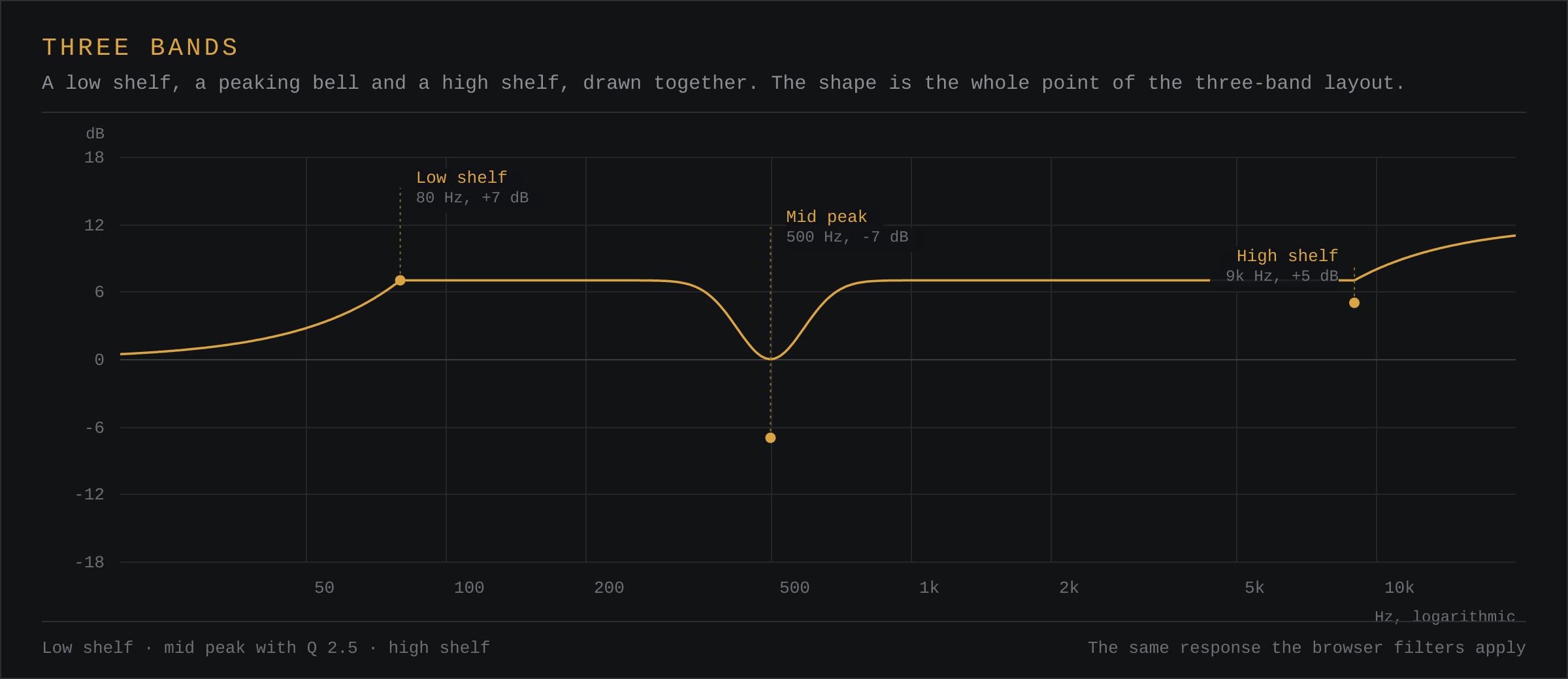
How the Three Bands Are Arranged
The low band is a shelf: it raises or lowers everything below its corner frequency. The mid is a bell with an adjustable Q. The high band is a shelf above its corner. That covers the three moves that resolve most problems — trimming the bottom, removing a boom or a honk, and softening or opening the top.
Reading the Curve
The dashed line over the spectrum is the combined magnitude response of the three filters, centred on the −36 dB gridline. It shows shape, not absolute level, so ignore its vertical position and watch the bends.
Dragging the Dials
Drag up or down on a dial to change it. Hold Shift while dragging for fine adjustment, double-click a dial to type an exact value, or focus it and use the arrow keys. Every control is also a native range input, so keyboard and screen reader users get the same range and step information as everyone else.
How the Trainer Scores
The hidden boost is one of eleven frequencies between 80 Hz and 8 kHz. A guess within a third of an octave counts as correct; within one octave counts as close; anything wider is a miss. A third of an octave is roughly the smallest distance most people can reliably distinguish on a single-band boost, which is why the threshold is set there.
The score is not stored between visits. It is a practice aid, not a test.
Questions
What Does Q Mean on an Equaliser?
Q controls how narrow the bell is. A Q of about 1 affects roughly an octave either side of the centre frequency. Higher values narrow the affected region, which is useful for surgical cuts; lower values widen it, which suits broad tonal shaping.
Should I Cut or Boost First?
Cut first. Removing an unwanted peak lowers the level of everything around it and leaves more headroom. Boosting raises the level of the peak as well as the region you wanted to hear.
How Does the Frequency Trainer Work?
The trainer applies a hidden 6 dB boost somewhere between 80 Hz and 8 kHz, then asks you to identify it by ear. The boost is deliberately kept out of the drawn EQ curve, so the only way to answer is to listen.