Tool 03
Dynamics Compressor
The transfer curve is drawn from the settings you choose, and the gain-reduction strip measures what the compressor is actually taking off the signal. Drag a control and the curve moves before you hear it.
Compressor Workspace
or drop a file here.
Load a file or a demo loop to begin.
- Reduction at 0 dBFS
- 0.0 dB
- Reduction at −18 dBFS
- 0.0 dB
- Output at 0 dBFS
- 0.0 dB
Compressor
Reading the Curve
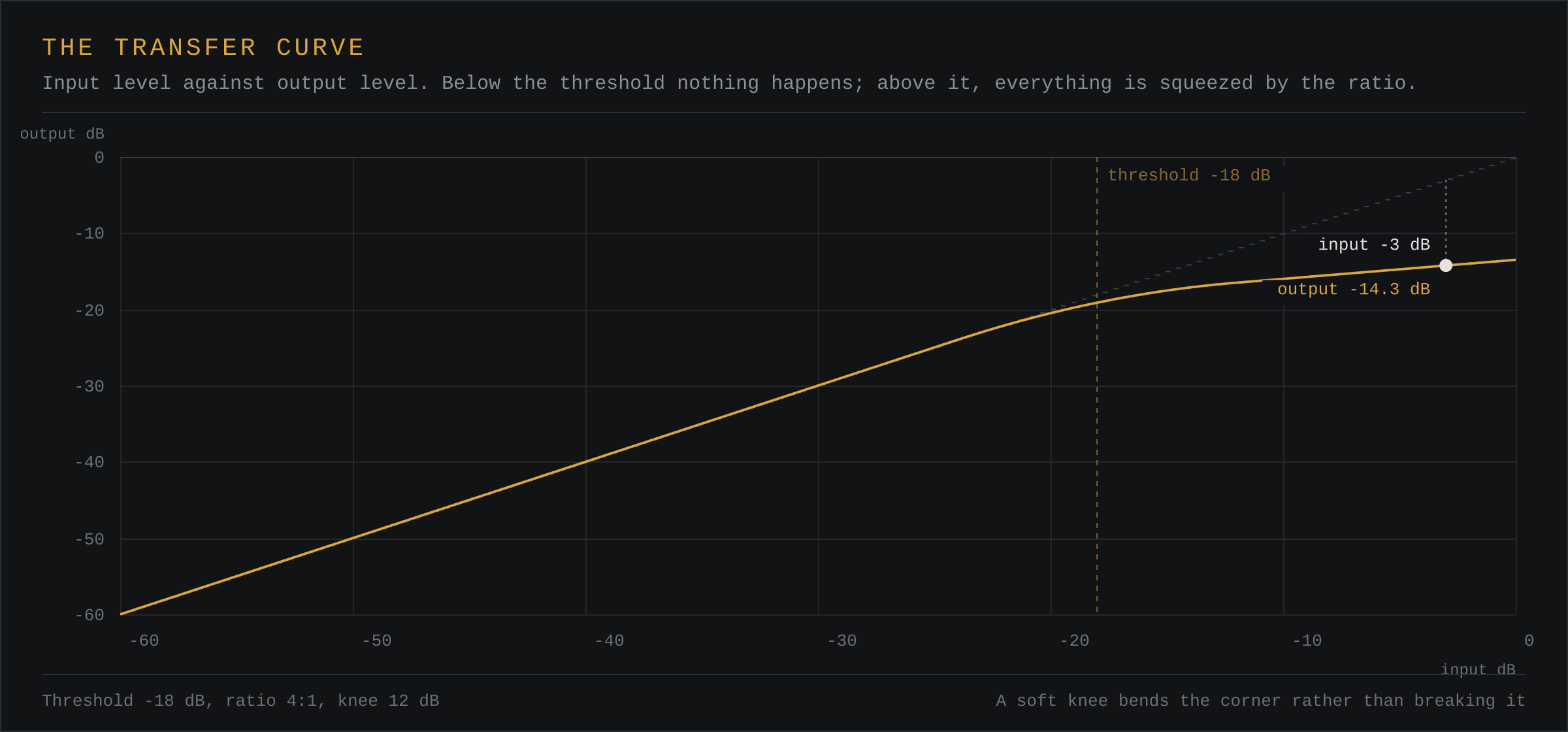
The horizontal axis is the input level, the vertical axis the output level, both from −60 to 0 dB. The faint diagonal is unity: if the curve sat on it, nothing would be happening. The amber line is what your settings produce. Below the threshold it follows unity exactly, because the compressor does nothing to signal that is not over the threshold.
The vertical amber marker is the threshold. The white dot is the signal as it arrives right now, and the dashed drop to it is the gain reduction being applied at that instant.
What Each Control Actually Does
Threshold is the level above which the compressor acts. Set it so the compressor only catches the loudest events — on a drum loop, somewhere between the level of the kick and the level of the quieter ghost notes.
Ratio is how hard the over-threshold signal is squeezed. 2:1 is a gentle leveller; 4:1 is a common working ratio; 10:1 and above behaves much like a limiter. Attack decides how quickly the compressor responds, and therefore whether transients survive. Release decides how quickly it lets go, and setting it too short causes the level to pump on material with slow passages.
Knee rounds the corner where compression starts. A hard knee is a switch; a wide knee is a gradual slope, which is easier on material that hovers around the threshold. Makeup is the gain added back afterwards, because compression always makes things quieter.
A Note on the Measurement
The gain-reduction strip is computed from the measured peak level at the input, against the curve your settings describe. It is a model of the compressor, not a tap on the internal detector, so it will differ slightly from a hardware unit or a plugin. The shape and the direction are right, which is what the control needs to teach.
Questions
What Does the Knee Do?
The knee softens the corner of the transfer curve. With a hard knee the compressor switches from no compression to full ratio immediately above the threshold. A wider knee makes the transition gradual, which sounds smoother on material that regularly sits near the threshold.
What Attack Time Should I Use?
Short attacks (under 10 ms) let transients through and compress only the body of the sound. Longer attacks (20 ms and up) treat the transient as part of the signal and pull it down, which is how you get a harder, more controlled sound.
Why Does the Compressor Make Things Quieter?
That is gain reduction doing its job. A 4:1 ratio takes every 4 dB above the threshold down to 1 dB, so the signal is quieter. Use the makeup control to bring the level back to where it was before compression.