Guide · Dynamics
How to Set Up a Compressor
A compressor has five controls and no correct settings. What it has is a method: a way of working through the controls in an order where each decision informs the next. Get the order right and the settings take ten minutes. Get it wrong and you will spend an hour chasing a sound that keeps moving.
What the Controls Actually Do
Before touching anything, it helps to know what each control changes about the signal.
- Threshold sets the level above which the compressor acts. Below it, nothing happens at all. This is the most important control, because it decides how much of the signal is involved.
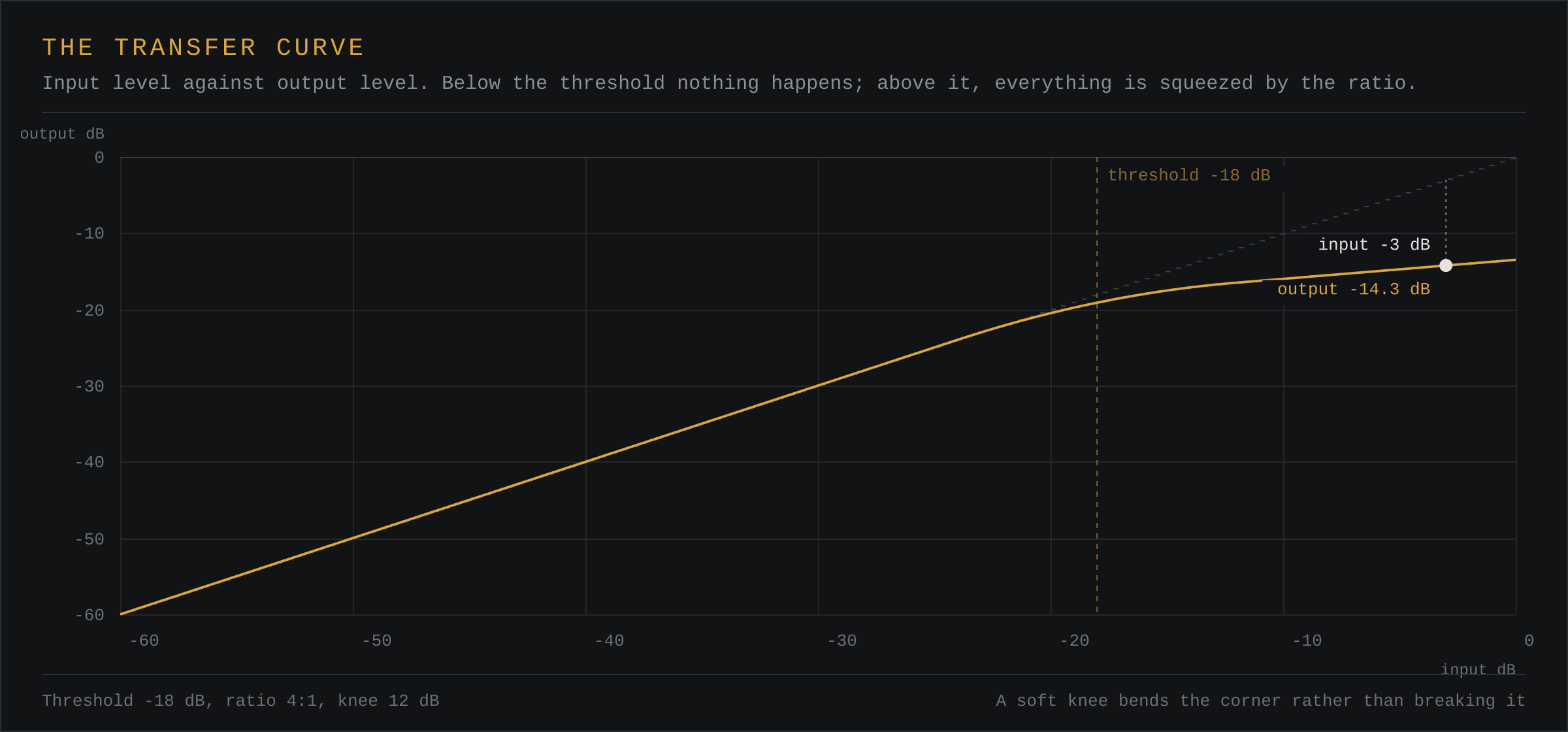
- Ratio sets how hard the signal above the threshold is squeezed. At 2:1, the signal is reduced by half. At 4:1, by a quarter. At 20:1, it barely moves, which is limiting.
- Attack sets how quickly the compressor responds once the threshold is crossed. Short attacks let transients through; long attacks pull them down.
- Release sets how quickly the compressor lets go once the signal falls back below the threshold. Short releases pump; long releases flatten the envelope.
- Knee sets how gradually the compressor gets into its ratio. A hard knee switches on sharply; a soft knee bends into it.
The compressor on this site draws all of this as a transfer curve, so you can see the effect of each control before you hear it.
Step One: Start With Nothing
This is the step people skip, and it is the reason their settings do not work. Before you set a threshold, set everything else to neutral:
- Ratio at 1:1, or at least 2:1.
- Attack at a fast setting, 10 ms or so.
- Release at a middling setting, 100 ms or so.
- Knee at its widest, or hard, depending on what you are about to do.
At a ratio of 1:1 the compressor does nothing at all, whatever the threshold. That means you can find the threshold by listening to the sound changing and nothing else, with no ratio muddying what you hear.
Step Two: Set the Threshold
Play the material at a level that feels like a finished mix, not a solo. This matters: a threshold is a level, and a level only means something relative to how loud the rest of the arrangement is.
Bring the threshold down until the meter starts to show gain reduction, then bring it back up until it only catches the peaks. That is your threshold. You want the compressor to be involved on the loudest events and quiet on everything else, because a compressor that works constantly is just making the whole thing quieter.
For most material, 3 to 6 dB of steady gain reduction is the working range. Above about 10 dB you are no longer levelling, you are making a decision about the entire envelope, and the sound usually tells you so.
Step Three: Set the Ratio
Now add ratio, and only then start to hear what the compressor is doing to the sound. The ratio determines how much the dynamics are narrowed.
| Ratio | What it does | Typical use |
|---|---|---|
| 1:1 | Nothing. The signal passes through unchanged. | Finding the threshold. |
| 2:1 | Gentle levelling. Halves the excess over the threshold. | Background vocals, room mics, bus glue. |
| 3:1 | Noticeable control without sounding compressed. | Most instruments. A good default. |
| 4:1 | Clearly audible reduction above the threshold. | Kick, snare, bass, aggressive vocals. |
| 6:1 to 10:1 | Heavy. Only the loudest peaks move much. | Drum bus, parallel compression, punch. |
| 20:1 and above | Effectively a limiter. | Mastering, catching peaks only. |
If you are not sure, use 3:1 and listen. The ratio is the control most likely to make a source sound like a different instrument rather than a controlled version of itself.
Step Four: Set the Attack
Attack decides whether the compressor hears the transient as part of the thing it is controlling.
A fast attack, under 10 ms, reacts before the transient has finished, so the transient passes through and only the body is compressed. This is the punchy setting. Almost every drum and most bass work wants it.
A slow attack, 20 ms and up, lets the transient develop before the compressor clamps down on it, so the transient gets squashed along with everything else. This is the controlled, glued, slightly harder setting. It is also what makes a vocal sit further back, which is why slow-attack compression is a favourite on background vocals.
If the material has a clear transient, start fast. If it does not, or if you want the transient gone, start slow.
Step Five: Set the Release
Release is the control people get wrong most often, because the right value depends on the tempo of the material.
The rule of thumb is that the release should be roughly the time between the events you are controlling. At 120 BPM, an eighth note is 250 ms and a sixteenth is 125 ms. For a kick that hits every beat, a release of 80 to 150 ms lets it breathe before the next hit. For a kick on every eighth, you want it shorter, or the second kick arrives while the compressor is still holding on.
A release that is too short produces pumping: the level visibly rises and falls with the pattern. A release that is too long produces flattening: the compressor never fully releases, so the quietest parts are lifted along with the loud ones.
Listen specifically for the gap after each hit. If the level swells there, your release is too short.
Step Six: Set the Knee
The knee is a finishing touch. A hard knee is correct for most sources, because it means the compressor does exactly what you told it to. A soft knee of 6 to 12 dB is worth trying on material that sits right at the threshold, such as a master bus or a heavily limited drum bus, where a hard knee produces an abrupt change in behaviour.
If the gain reduction meter jumps on and off erratically, that is a hard knee working on material that hovers around the threshold. A soft knee fixes it.
Starting Points
These are not rules, but they are places where you can begin and then move by ear.
- Kick — 4:1, 10 ms attack, 100 ms release, threshold set to catch about half the hits. You are looking for 3 to 5 dB of gain reduction.
- Snare — 3:1, 5 ms attack, 120 ms release. Slower than the kick, because a snare tail should be allowed to decay.
- Lead vocal — 3:1, 15 ms attack, 100 ms release, 6 dB knee. The slightly slow attack is what keeps the vocal sitting back.
- Bass — 3:1, 20 ms attack, 100 ms release. Slow attack, so the note defines itself before the compressor clamps.
- Mix bus — 2:1, 30 ms attack, 100 ms release, wide knee. Gentle glue, no more than 2 dB of reduction. If the bus meter is moving more than that, something upstream is too hot.
How to Know It Is Working
- The gain reduction is steady. It should sit at a fairly constant level during the loud parts and drop to nothing in the quiet ones.
- The loud parts are closer to the quiet parts. Not the same level, but closer.
- Nothing is pumping. Listen for the level breathing with the pattern.
- The transient is still there. If the kick has lost its punch, your attack is too slow.
- You made it up afterwards. If you need to boost the level after compressing, that is gain reduction, and it is normal. Most people forget to.
Common Mistakes
Setting the threshold with the source too quiet. A threshold is a level. Set it while soloing and it will be wrong in the mix.
Using 20:1 on everything. Extreme ratios on every source leave no dynamics anywhere, and a mix with no dynamics has no impact.
Compressing a signal that is already compressed. If a kick is already limited hard, adding a compressor on top makes it smaller and duller, not bigger.
Ignoring the makeup gain. Compression always makes things quieter. If you do not push it back up, you will decide the compressor made it worse.
Questions
What order should I set a compressor in?
Threshold first, then ratio, then attack, then release. Threshold decides how much signal triggers the compressor, ratio decides how hard it is squeezed, attack decides whether transients survive, and release decides how quickly it lets go.
What is a good starting ratio?
2:1 for gentle levelling, 3:1 or 4:1 for most instruments, and 8:1 or more when you want an obvious effect. Anything above 10:1 behaves much like a limiter.
How do I set the attack time?
Short attacks, under 10 ms, let transients through and compress only the body. Longer attacks, 20 ms and up, treat the transient as part of the signal and pull it down, which sounds harder and more controlled.
How much gain reduction is too much?
For most material, 3 to 6 dB of steady gain reduction is a working compressor. More than about 10 dB and the compressor is doing the mixing for you, and the sound usually suffers for it.