Guide · spectrum
How to Read a Spectrum Analyser
A spectrum analyser shows how energy is distributed across frequency at one instant. It is a measurement, not a picture of the mix, and knowing what it cannot show is as useful as knowing what it can.
The Two Axes
The horizontal axis is frequency, almost always logarithmic, from about 20 Hz to 20 kHz. The vertical axis is level in decibels. Because the axis is logarithmic, each labelled step doubles the frequency: 100, 200, 500, 1k, 2k, 5k, 10k. That spacing matters more than it first appears — an octave near 100 Hz is a narrow band on screen, while an octave near 8 kHz is wide.
Why the Scale Is Relative
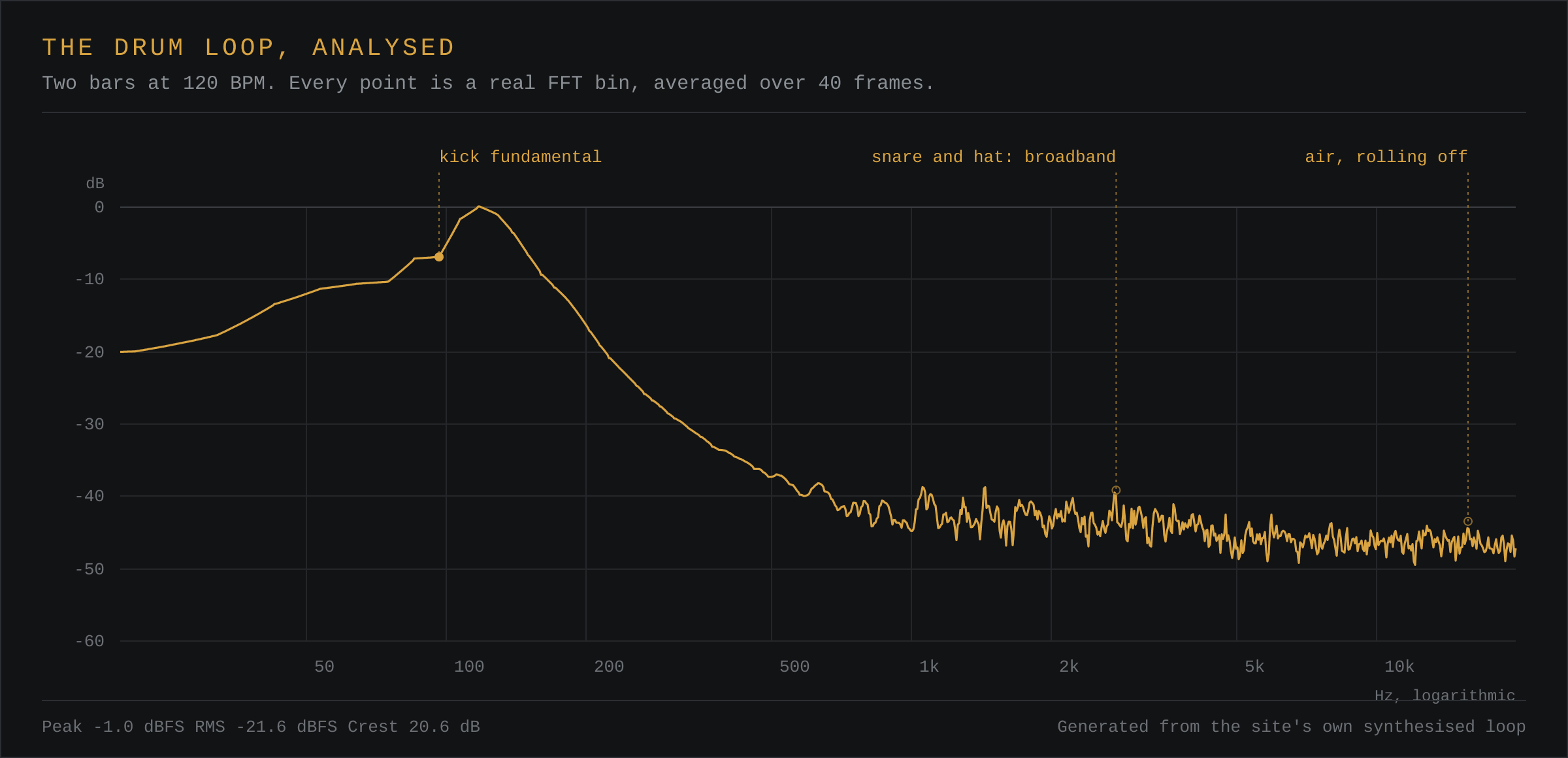
A single FFT bin sits far below the peak level of a file, so a fixed 0 dBFS-to-−80 dB scale squashes every real signal into the bottom of the frame. Most analysers solve this by scrolling the window to follow the loudest part, which makes the display jump around. This one holds the scale at 60 dB below the loudest bin in the current frame instead, so the curve always fills the display and the top of the frame is always the loudest thing playing.
The practical consequence is that the vertical axis shows shape, not absolute level. Two files drawn one after the other will not sit at the same height if one is simply quieter. For absolute figures, use the numeric readouts underneath the graph.
Smoothing and Averaging
Every analyser averages somehow. Without it the display flickers too fast to read. This site uses a smoothing constant of 0.75 between frames, which gives a readable trace with roughly a fifth of a second of memory. The catch is that very short events — a click, a single snare crack — are blended into the display and look quieter than they are.
The peak-hold line, drawn more faintly, keeps the maximum of each column and decays slowly. Use it to catch transients; use the live trace to judge the body of the sound.
Shape, Not Level
The height of the line shows relative energy. A bass note at 55 Hz will usually sit far higher than anything above 2 kHz, and that is normal. Do not conclude that the top end is missing because the line slopes down: most music has most of its energy in the bottom two octaves.
What matters is the relationship between neighbours. A narrow spike against a flat region is a resonance or a single tone. A broad hump is a tonal signature. A step where the line falls abruptly at the top is a low-pass or a lossy format.
Where the Bins Run Out
A 4096-sample transform at 44.1 kHz gives roughly 10.8 Hz per bin, so the bottom of the display is well resolved and the top is not: one pixel at 10 kHz covers hundreds of bins. The tool averages the bins inside each pixel rather than taking the highest, which is why the curve stays smooth instead of breaking into a comb of unrelated peaks.
Things It Will Not Tell You
- Whether something sounds good.
- Whether two parts are actually masking each other, which depends on time as well as frequency.
- What is happening between the 1/48th-octave bins it does not draw.
- How loud the file will feel after normalisation.
Spectral Tilt
Spectral tilt is the general slope of the line from low to high frequency, ignoring the peaks on top of it. A mix whose energy falls by roughly 4.5 dB per octave is close to pink noise, which is what most music approaches once it is balanced. A flatter line is bright and thin; a steeper one is dark and heavy.
Tilt is useful because it is the one reading you can compare between two files without matching their levels first. A part can be quieter than another and still have the same tilt, and that is the sense in which two parts can be said to share a character. What tilt will not do is tell you which part is wrong. It only says whether the overall balance leans one way.
A Worked Comparison
Load the drum loop, note where the line peaks, then load the bass line and watch the same display. The kick in the drum loop is a single narrow peak near 55 Hz with a broad, low shelf of noise above it. The bass line peaks lower and moves: as the note changes, the peak slides, which is the visible difference between a tone and a hit. A drum transient is briefly wideband, so it shows as a peak that flickers; a sustained synthesiser note is a bar that stays put.
That single observation does more for your reading speed than any amount of theory. Discrete peaks that hold still are pitched material. Peaks that appear for a frame and vanish are transients. Broad humps that neither move nor fade are the character of an instrument or a room.
The Three Misreadings Worth Knowing
Reading the top of the frame as 0 dBFS. On a relative display it means nothing of the sort. Look at the numeric readouts for absolute values, and never judge headroom from the shape of the curve.
Hunting for a problem that is not there. A notch in the display is often the source material rather than a fault. Before you cut, confirm the notch moves with the note or stays fixed across the whole file. Fixed is a room or a filter; moving is the instrument.
Trusting one frame. Any single update of the display is a snapshot of a few milliseconds. Watch for two or three seconds before deciding, because a stable peak and a pulsing one look identical in a still.
Questions
What does a spectrum analyser show?
The level of each frequency present in the signal over a short window of time, usually a few tens of milliseconds. It is a measurement of energy against frequency, not a picture of what the mix sounds like.
Why does the line slope downwards?
Because most music has most of its energy in the low frequencies. An octave near 100 Hz covers a hundred hertz, while an octave near 8 kHz covers eight thousand. The sloping line is the normal shape of recorded music, not a fault.
What is spectral tilt?
The average slope of the spectrum from low to high, ignoring individual peaks. Pink noise falls by about 4.5 dB per octave, and most balanced music sits close to that. A flatter tilt sounds bright and thin; a steeper one sounds dark and heavy.
Should I mix with my eyes on the analyser?
No. Use it to confirm what you already hear, or to find something you suspect but cannot locate. A decision made only from the graph will usually be an over-correction, because the ear and the graph respond to different things.